The org chart that draws itself.
Assign people to Parzify in your identity provider. Their profiles arrive, managers are linked, and a clear, beautiful chart appears. When someone joins, moves or leaves, it updates on its own. Okta today, more providers next.
Set up in about 15 minutes. Free while you try it, no card needed.
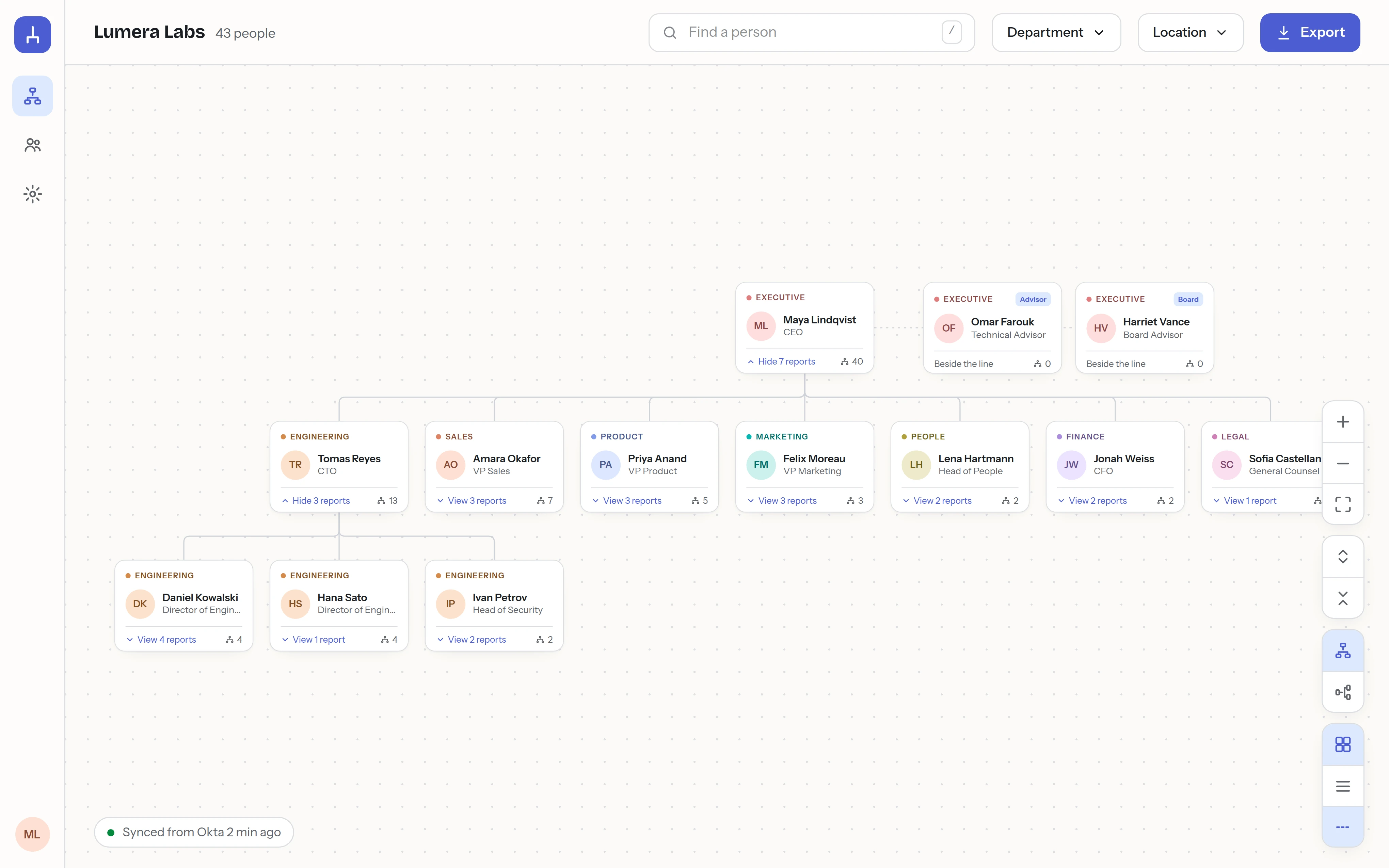
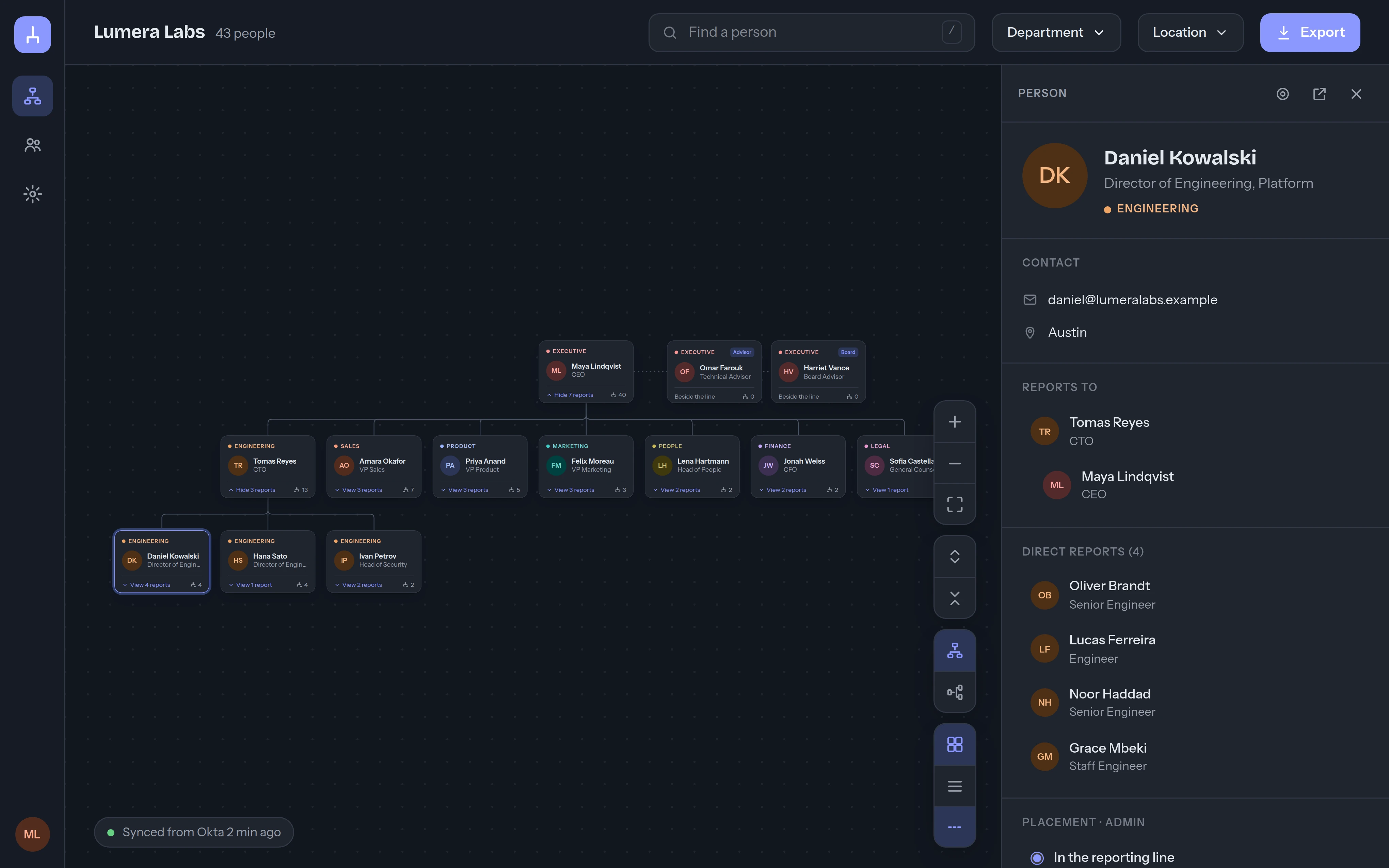
This is what your company sees.
A clean chart that opens collapsed to leadership and expands where you look. Click anyone for their profile, reporting chain and team. Light and dark, because IT lives in dark mode. Shown with a fictional company.
Every org chart is out of date the week after it's made.
Somebody rebuilds the slide before the all-hands. The wiki page says a person reports to a manager who left in March. New hires ask in Slack who owns what. The information exists, in your identity provider, but nobody wants to redraw boxes.
Rebuilt by hand before every all-hands. Correct for a day.
Three tabs, two owners, one column nobody updates.
Last edited 14 months ago. Still the first Google result internally.
Three steps. Then never again.
Connect Okta
A guided setup with screenshots walks your Okta admin through single sign-on and provisioning. About 15 minutes, no consultant.
Assign a group
Assign your Everyone group to Parzify. Okta pushes every profile: name, title, department, manager. People appear within seconds, whether or not they ever sign in.
The chart draws itself
Parzify links each person to their manager and lays out the tree. A Data health page shows the few records worth fixing, with the exact Okta attribute to change.
Simple on the surface. Careful underneath.
A chart people actually use
Lean cards, department colors, one click to see anyone's manager chain, direct reports and contact details. Vertical or horizontal, cards or compact, light or dark.
Search and filter
Find a person by name, title or team. Filter by department or location and the chart opens the right branches and dims the rest.
Dotted lines
Real companies have them. Add secondary reporting lines with a label, and they draw as dotted curves that fade when they are not relevant.
Advisors beside the line
Board members, advisors and fractional leaders sit next to the top of the chart with a badge, not squeezed into a reporting line they are not in.
Data health
Every person the resolver could not place, with the raw Okta value that needs fixing. Cycles, ambiguous names and managers who left are all caught.
Export
PNG, SVG or PDF of the current view, for the board deck or the onboarding guide. Photos included.
Directory and profiles
A searchable people directory and a profile page for everyone, with photo, local time, and an about section people write themselves.
Audit and sync logs
Every admin action and every provisioning request from Okta, timestamped. Your auditor will like it. So will you when something looks off.
SSO and SCIM in every plan
OIDC single sign-on and SCIM 2.0 provisioning with a guided, screenshot-driven setup. Group assignment, deactivation, attribute mapping: all handled. Never an enterprise-tier upsell.
Built by an IT lead who has answered the vendor questionnaire from the other side.
Tenant isolation on every query. Secrets encrypted at rest. Authenticator required for admins. Hosted on AWS with nightly encrypted backups and a tested restore. Full audit trail. SOC 2 on the roadmap, and honest answers in the meantime.
Read the security page- SSO + SCIM on every plan
- TOTP for admins
- AES-256 at rest
- TLS 1.2+ everywhere
- Per-company isolation
- Audit + sync logs
- AWS us-east-2
- Daily backups to S3
Okta today. The rest of your stack next.
Parzify speaks standard OIDC and SCIM 2.0, so any provider that does too can already push people in. Guided setup exists for Okta; Microsoft Entra ID and Google Workspace guides are on the roadmap.
Where does the chart come from?
From your identity provider. You assign people to Parzify in Okta, Okta pushes their profiles over SCIM, and Parzify links everyone to their manager using the manager attributes you already keep. Nobody draws anything.
What happens when someone joins, moves or leaves?
Okta tells Parzify within seconds. New people appear under their manager, a manager change moves the whole branch, and people removed from the app disappear from the chart. The chart is always the current state of your company.
What if our manager data in Okta is incomplete?
Parzify resolves managers by email, Okta id, employee number or display name, whichever you have, and the Data health page lists exactly which people it could not place and which attribute to fix. Most companies are clean within an hour.
Do employees need to log in?
Only to look at the chart. Accounts are created by provisioning, so the chart is complete before anyone signs in. People sign in through Okta with one click.
Which identity providers are supported?
Okta today, with both single sign-on (OIDC) and SCIM provisioning. Microsoft Entra ID and Google Workspace are next on the roadmap. Any SCIM 2.0 client can already push people to Parzify.
Is it secure?
Every company is isolated, secrets are encrypted at rest, admins use an authenticator app, and every admin action is logged. Read the security page for the full list, including hosting and backups.
Your chart is 15 minutes away.
Create your company, connect your identity provider with the guided setup, assign a group. That's the whole implementation.